
This piece explains what search appearances actually measure. JobSearchDx checks whether your own profile is findable for the jobs you actually want. About two minutes. Your first fix is free.
Check your findability→Search appearances is an easy number to treat like a stock ticker. Up feels good, down feels bad. But the count by itself can't tell you the one thing you actually want to know: whether the right people are finding you.
What Search Appearances actually measures
LinkedIn tracks a few metrics here that are easy to mix up. Profile appearances is the broad one: how often your profile showed up anywhere on LinkedIn, in search, in feeds, in comments, in recommendations. Search appearances is narrower: specifically how often you showed up when someone ran a search. Profile views are different again, that's people who actually clicked through and looked at your profile.
If you post or comment often, that activity can dwarf your search count inside the broad total. So the headline appearances number is telling you about your overall visibility, not specifically about whether recruiters searching for candidates are finding you.
Why 500 appearances can be worse than 100
Showing up in a search doesn't tell you what someone was searching for. If your profile surfaces for searches unrelated to the roles you want, that's a bigger number and it's worse for you than a smaller number made up entirely of the right searches. A recruiter who filters for a title you don't hold, in an industry you're not targeting, and happens to land on your profile anyway isn't a lead. It's noise wearing the shape of good news.
The number that matters isn't the total. It's whether the searches you're appearing in match the jobs you're actually going for.
What recruiters can filter and search
LinkedIn Recruiter gives recruiters more than 40 filters, including job titles, location, skills, companies, industry, and seniority, plus keyword and Boolean search on top of that. Your search appearances are the downstream effect of matching some combination of those. If a recruiter filters by title and location and you match, you show up. If you don't match the filter, you don't show up in that search, no matter how good the rest of your profile reads.
LinkedIn also now supports AI-Assisted Search, where a recruiter can describe a candidate in plain language or paste in a full job description, and matching can pick up on qualifications that aren't literally listed as skills on your profile. That's a real shift in how appearances get generated, not just a filter match anymore but an inference. For the fuller mechanics of how that works, see How Recruiters Find Candidates on LinkedIn in 2026.
How to diagnose low or wrong search appearances
If your count is low, or you suspect it's the wrong kind of high, check these in order:
✅ Title. Does your current title use language that matches how your target roles are titled, not just your actual internal title.
✅ Skills. Are the skills recruiters would filter for listed explicitly, and do they also show up as evidence in your experience bullets.
✅ Experience language. Do your bullets use the vocabulary your target jobs use, or the vocabulary your last company used internally.
✅ Location. Is your location set in a way that matches where the roles you want are actually being filtered for.
✅ Open to Work. If it's on, are the job titles and locations you've listed there actually the ones you want to be found for.
How to choose target language without keyword stuffing
Don't guess at what recruiters search for. Pull the actual postings for roles you want, several of them if you can, and look at what repeats: titles, required skills, tools, qualifications. That repeated language is a much better source than a generic "best keywords" list, because it's specific to the roles you're actually chasing rather than the category in general.
How to measure whether an edit worked
Set a baseline before you change anything. Note your current search appearances and, if you can see it, the job titles you're being found for. Make your changes. Give it two to four weeks, LinkedIn's indexing and its personalized ranking don't update instantly, and a few days of data is mostly noise. Then check again, and look specifically at whether the titles you're appearing for shifted toward what you actually want. An unfocused count that grew isn't a win. A focused count that grew, even modestly, is.
One honest caveat: LinkedIn's own documentation says people-search ordering is personalized to the person searching, based on relevance and their filters. There's no universal rank for your profile. That also means you should expect some natural noise week to week and not overreact to a single dip or spike.
What I changed on my own profile
When I rebuilt my own profile, I changed several things at once: my headline, my About section, some of the skills listed, the bullets under my roles, and the job titles themselves. My guiding principle was simple: describe my work in the language recruiters use for it now, because that language drifts over time. I didn't test the changes one at a time, so I can't tell you which single edit mattered most. What I can tell you is the result: Recruiter became my top searcher title, and my weekly search appearances went from about 190 to 355 in a month. A bundle of changes, not a formula.
Check your own numbers
You'll find this on your own profile: click the Me icon, then View profile, then scroll to the Analytics section and click Search appearances.
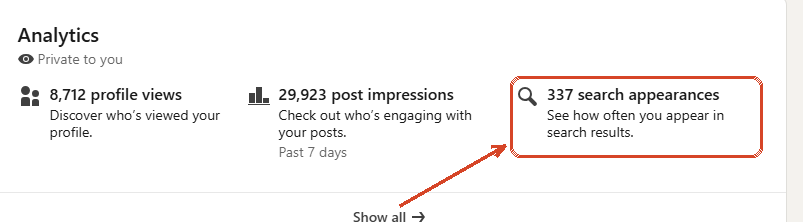
From there, dropdowns let you see the top job titles of the people searching for you and, separately, the job titles you were actually found for. That second view is the one worth your attention. If the titles you're being found for don't look like the job you're trying to get, that's your actual diagnostic, regardless of what the total number says. LinkedIn gates some of the deeper engagement stats behind Premium, but the search appearances view and its breakdowns are documented in LinkedIn's help pages as a member feature.
Reading your own analytics only tells you what's happening. It doesn't tell you what to fix or how urgent each gap is. That's what I built JobSearchDx to do: paste your profile and the jobs you're targeting, and it grades your findability against those specific roles and ranks what to change. The grade and your biggest fix are free. It's a much cheaper first step than hiring a LinkedIn coach, and worth trying before you do. Coaches offer real value beyond what any tool can, you'll likely get more out of one once the mechanical stuff is already fixed.
Sources for the LinkedIn product claims in this article: LinkedIn Help documentation on viewing your profile Search Appearances and on the difference between profile appearances and profile views; LinkedIn Talent Solutions Recruiter feature documentation; LinkedIn Help on the ordering of people search results; LinkedIn Recruiter Help on AI-Assisted Search. Product features described are current as of August 2026 and change over time.